We understand that events may be postponed for a variety of reasons, and DonationMatch has ways to minimize the effort and impact of postponing an event on both you as the event organizer as well as donor companies involved.
If your event is being cancelled and not simply postponed, please see article: "How Do I Handle a Cancelled Event on DonationMatch?"
UPDATING THE EVENT LISTING
If you need to postpone your event, and your event deadline has NOT yet passed:
- Log in to DonationMatch
- Click on the name of the event being postponed on your dashboard (or go to the "My Events" area and click on the event name)
- Click on the "Edit" button
- If you know the new date, simply change the Event Start/End dates and Donation Deadline as needed
- If you are unsure of the new date, use the "Unpublish Event" option (dropdown arrow next to Save button) to save your information for editing later :
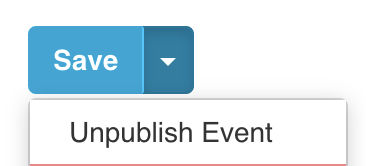
DON'T FORGET to return and add your new date once determined, then use the "Publish" option to reactivate requests!
If you need to postpone the event and you are making changes on DonationMatch AFTER your event's donation deadline or event date is in the past, please contact us at support[at]donationmatch.com with your new date to change it for you.
CHANGES TO DONATIONS
Most donations will not be significantly affected if your date is moved within the same year or season, however each donor company determines this for themselves. In general:
E-delivered gift certificates created by DonationMatch: Expiration dates and certificate information will be updated to reflect new event dates, so please delete/destroy any copies with old event dates. Duplicates and certificates with information that does not match DonationMatch records will become invalid. You will need to re-download new, updated certificates with your new event date (they should be ready by the time your new donation deadline is reached). Please keep in mind that some donations are time-sensitive and/or seasonal and unable to have expiration dates extended, so changing your event date may either shorten the redemption window significantly for the winner or require you to submit a request for a following season instead.
Picked-up donations: Unless told otherwise, you may assume these are still available for pickup, but may want to confirm prior to arrival. If items are in your possession, please use them as agreed.
E-delivered gift certificates created by donors or shipped/delivered donations: Donor companies handle the contents of these themselves, so please use the "Direct Message" option available on each donation record in the Match Activity > "Matched" area to contact a donor directly if there are issues with their donations as a result of changing your event date.