If your event listed on DonationMatch is canceled, please contact us at support[at]donationmatch.com using the email address associated with your account and include the:
- Organization Name
- Event Name & Date
We will assist you with notifying necessary donors so that you are not negatively affected on future requests and updating donor records for accuracy.
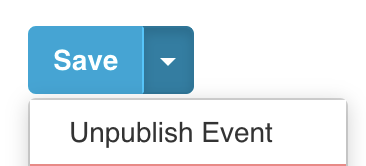
If possible, please also unpublish your event ASAP by:
- Logging in to DonationMatch
- Clicking on the name of the event being canceled on your dashboard (or go to the "My Events" area and click on the event name)
- Click the "Edit" button
- Selecting the "Unpublish Event" option (dropdown arrow next to Save button) to hide it: